A two-minute task shouldn't take ten. Drop in your Word, DOCX, or DOC file, and the conversion happens right in your browser, no installation, no registration, nothing to figure out. Dox to PDF works here too, with the layout and fonts preserved exactly as they were. What you built in Word is what lands in your PDF.
No of Files:
Actions
Please Upload Files
Very Poor
Bad
Satisfied
Good
Excellent
Help us improve
Very Poor
Bad
Satisfied
Good
Excellent
Online Word to PDF Converter Done in 3 Steps
Your Word documents contain work worth presenting properly. Whether it's a DOC report or a Word contract, this converter keeps every margin, font, and page break exactly where you placed them, no quality loss, no hassle.
Step 1: Upload Your Document
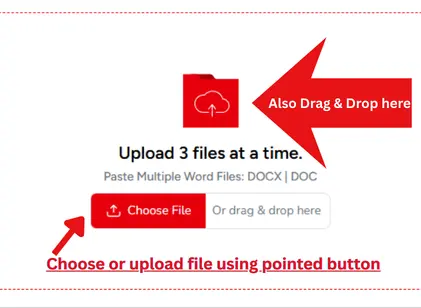
Hit the Upload button to add your Word files or drag and drop them straight into the upload area. This online Word to PDF converter accepts up to 3 files at a time, so batch conversions are covered too.
Step 2: Convert Your Document
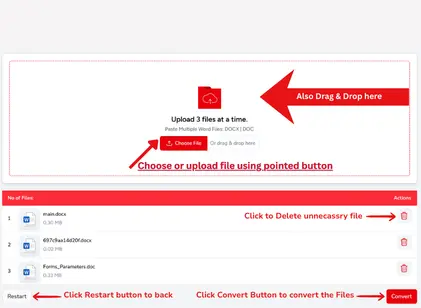
Once uploaded, your files appear in a list with their sizes shown alongside. Changed your mind on a file? Click the Delete icon to remove it before proceeding. When everything looks right, hit the Convert button and let the MS Word to PDF converter do its job.
Step 3: Download Your PDF
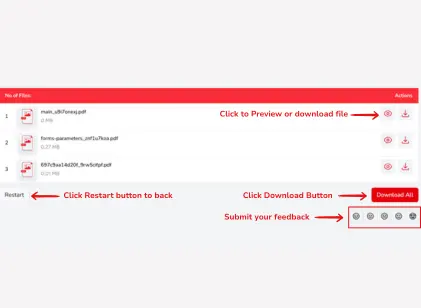
Conversion done now check your work. Click any file to preview it before saving. Happy with the result? Hit Download to save it to your device. Converting multiple files? The Download All button grabs everything at once. Clean, properly formatted PDFs every time whether it was a DOC file or a dox to PDF job.
Key Features of This Online Word to PDF Converter
Built for people who need more than a basic dox to PDF tool. This docx to PDF free converter handles batch files, preserves every formatting detail from your MS Word document, and delivers a clean PDF straight to your device, no watermarks, no signup, no hidden limits.
Multiple Upload Options
Uploading files one by one wastes time nobody has. This DOCX to PDF online free converter lets you add up to 3 word files at once and convert them all in a single run. No repetitive uploading, no waiting between files, just drop them in together and get every PDF back in one go.
Supports Multiple Word Formats
Not all Word files are saved the same way. This tool works with DOC and DOCM formats too, the same ones your MS Word to PDF converter needs to handle daily. Reports, contracts, essays, project files, whatever the format, the fonts, layout, and structure come through exactly as written.
Preview Before You Download
Opener, it is a gamble. Before saving anything, click the file to get a full preview of your converted PDF. Spacing off? Shifting layout? catch it before it reaches anyone else. Fix source file, re-upload and convert again in seconds, no friction, no wasted downloads.
Built for Every Type of User
Whether this is your first dox to PDF conversion or your fifteenth, the interface doesn't get in your way. The upload area, convert button, and download options are exactly where you'd expect them. No buried settings, no confusing menus just a clean workspace that gets the job done.
Fast Conversion, Private by Default
Upload your Word file, and the PDF is ready in seconds, no queue, no delays. Every file you submit is permanently removed from our servers the moment your download is complete. Nothing is stored, nothing is shared. Your documents stay yours.
Two Ways to Download Your PDF
Once conversion finishes, grab your files however works best. Download them individually by clicking each file, or hit Download All to pull every converted PDF at once. Running a batch of files through this DOCX to PDF online free converter? The bulk option saves the most time when it matters.
Frequently Asked Questions (FAQ'S)
Is Online2PDF safe?
Pretty much, yes. Files you upload get wiped from our servers right after your PDF is ready to download. No one has access to your documents during or after the process. If you're converting something sensitive like a contract or report, it won't sit on any server longer than it needs to.
Do I need to sign up or install anything?
No, you don’t need to sign up or install any software. Just upload your DOCX file, and download the PDF instantly.
Can I trust the security of my files?
All uploaded DOCX files are processed in a secure environment and automatically deleted after conversion.
Is it safe to use an online Word to pdf converter?
It depends on the converter. Some tools store your files longer than they should, which is where the risk comes in. This online Word to PDF converter deletes your uploaded files immediately after conversion. Nothing sits on the server, nothing gets logged. Sensitive document or not, it's handled the same way.
Will it function on all devices, such as mobile phones and tablets?
Yes, Solutions Pedia works on all devices, including desktops, laptops, tablets, and smartphones. You can convert your files anytime, anywhere.